🎬 Demo recording
Status: reference. Terminal segment recorded 2026-09-18 against
main; browser segment re-recorded 2026-10-01 (#809).
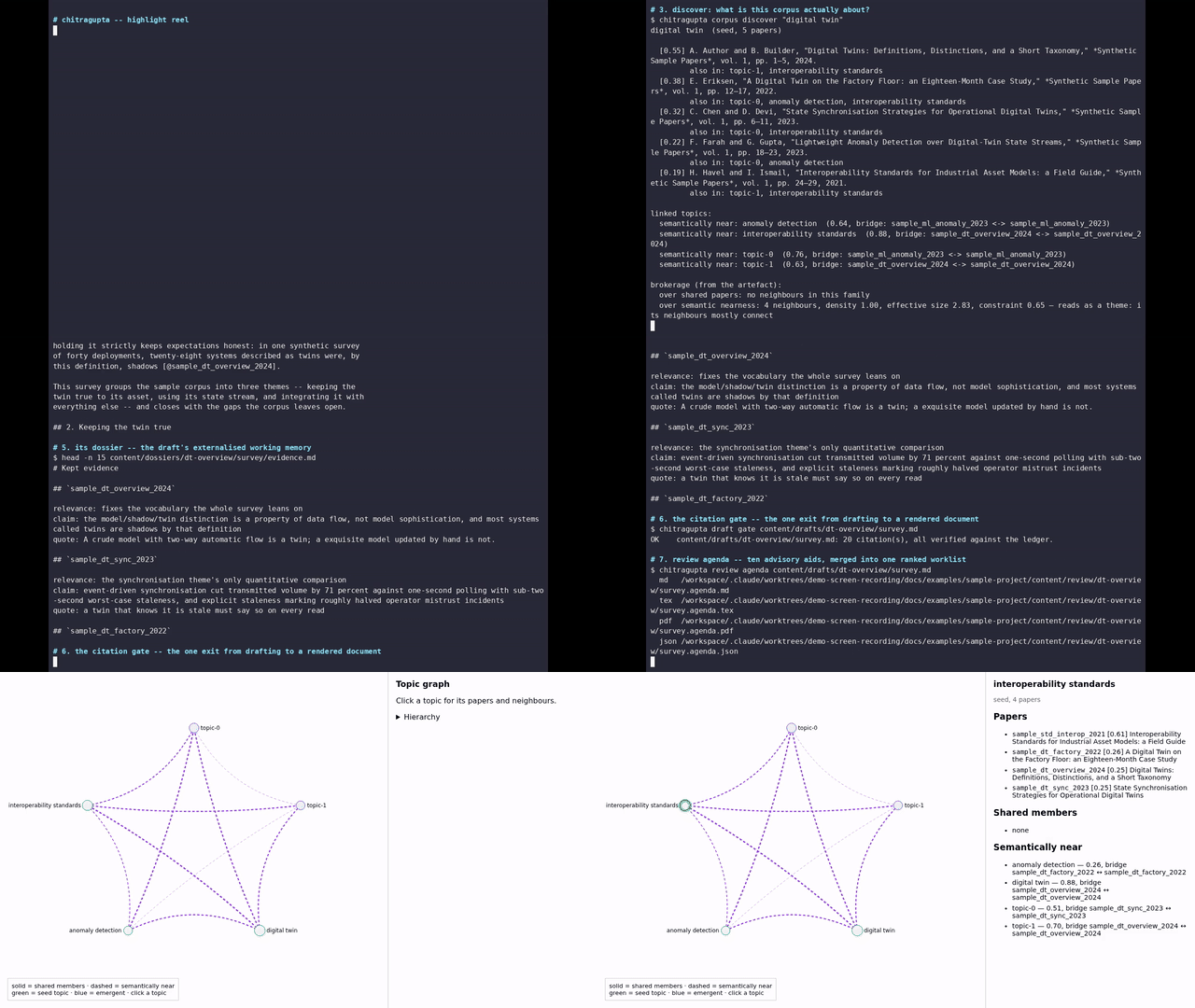
Written for anyone who wants to see the pipeline run before reading the rest of the documentation. It makes one pass through the spine (corpus sync, topic discovery, an already-drafted unit and its dossier, the citation gate, the review agenda, one more review aid), then looks at the offline topic-graph viewer in a browser. It was recorded against the committed sample project (docs/examples/), so every command in it is real and every citekey it cites is real; nothing here was invented for the recording.
The animated terminal segment alone is embedded inline in
README.md as docs/images/demo.svg. The full recording,
including the browser segment, is below.
A palette-optimised GIF of the same recording is also available:
docs/images/demo.gif. It is useful anywhere a
<video> tag or the two source formats above are inconvenient, at the
usual cost: the GIF is larger than either video encode of the same
content.
🧭 The longer all-features tour
A second, longer recording exists: thirty-seven steps across all four
layers (corpus, enrich, draft and review), ending on the same
browser segment. It is the one to watch to learn what the tool actually
has; the recording above shows what a first run looks like.
It is deliberately not shipped in this repository. At roughly two and
a half minutes it is several times the size of the recording above, it
dates faster than the reel does because it names individual commands, and
scripts/release.py bundles all of docs/ into the release archive. It
lives instead beside the corpus it was recorded against, in
content/chitragupta-demo-recordings/, alongside the shell script that
produced it, so it can be re-recorded against a later main without a
commit.
🚫 What the tour leaves out, and why
The tour shows the command surface; it does not prove that every command is covered. Three groups of commands are absent on purpose:
- The verbs that write to the sample project.
dossier init,spec sign,unit accept,tldr writeandregistry buildare the acceptance half of the book track, and arguably the most interesting thing the pipeline does, but each one changes committed sample state, and nobody can re-run a recording that leaves the repository dirty. WRITE-A-BOOK.md walks that half in prose. review union. It reads an assembledbook.tex, and the sample project'stwin-basicsdeliberately ships as un-assembled units. There is nothing in the checkout for it to read.- The live-LLM skills, and the
doclingstage. The genre skills (survey, thesis chapter, tutorial, …) need a model, anddoclingis the slowest stage in the pipeline with nothing committed depending on it; the sample project's ownregenerate.shskips it for the same reason.draft figuresis still shown, reporting honestly that the stage has not run.
🛠 How they were made
Terminal segments: asciinema recorded a real shell session (112x32)
against docs/examples/sample-project. Installed package resolution was
shown via pip install --dry-run, and everything after that was a real
python -m chitragupta.* invocation. The non-narrative span (the
dependency-resolution scroll) was then sped up and the rest slowed
slightly by dividing the recorded event timestamps. A player's speed
control could not do this, since the inline SVG has none. The result was
rendered to SVG (svg-term-cli --window, a CSS @keyframes animation, no
<script>) and to video (agg, then ffmpeg at 1280x720/15fps).
The browser segment drove the committed
docs/examples/sample-project/content/topic_map.html over CDP with
Puppeteer against a headless Chrome, screenshotting each interaction and
assembling the frames into video with ffmpeg. The capture script
asserts the number of rendered topic circles against the topic count the
page itself embeds, and fails the run on a mismatch. Without that check,
a selector that has moved would yield a video of the same establishing
shot repeated, which is exactly what the viewer's markup change since the
first recording would otherwise have produced. It also checks, after every
click, that the panel names the topic just clicked.
The browser segment was re-recorded on its own on 2026-10-01, when the
sample page was re-emitted in merge-tree leaf order (#809) and its
circle moved. Only the browser segment shows that circle, so the
terminal segment was kept as it was: the first 40.4 seconds of
demo.mp4 are stream-copied from the previous file, cut on the
keyframe where the browser segment starts, and decode to the same
frames. The new browser segment was encoded with the same libx264
-crf 20 settings and joined on after them. demo.webm (libvpx-vp9
-crf 32 -b:v 0) and demo.gif (fps=10, scale=640, a single
palettegen/paletteuse pass) were then re-encoded from the new
demo.mp4. The GIF chain reproduces the previous demo.gif byte for
byte from the previous demo.mp4; the VP9 encode does not, though its
keyframe layout and size match to within 1%. demo-webapp.png is the
topic-1 frame of the new capture. demo.svg is terminal-only and did
not change.
Nothing in either segment touched a real project. The sample project's
committed drafts, dossiers and reviews were only read; the commands that
do write tracked files (draft evidence, draft render, review
agenda) were run against it and the tree restored afterwards, and a
recording is only kept if git status on
docs/examples/sample-project/ comes back empty.