Home

Turns a BibTeX bibliography into grounded survey papers, thesis chapters, undergraduate textbook chapters and hands-on tutorials, with every citation traceable back to a paper the bibliography actually holds.
Named for the Hindu god who keeps the ledger of every deed and audits souls against it -- which is what this does to citations. See more.
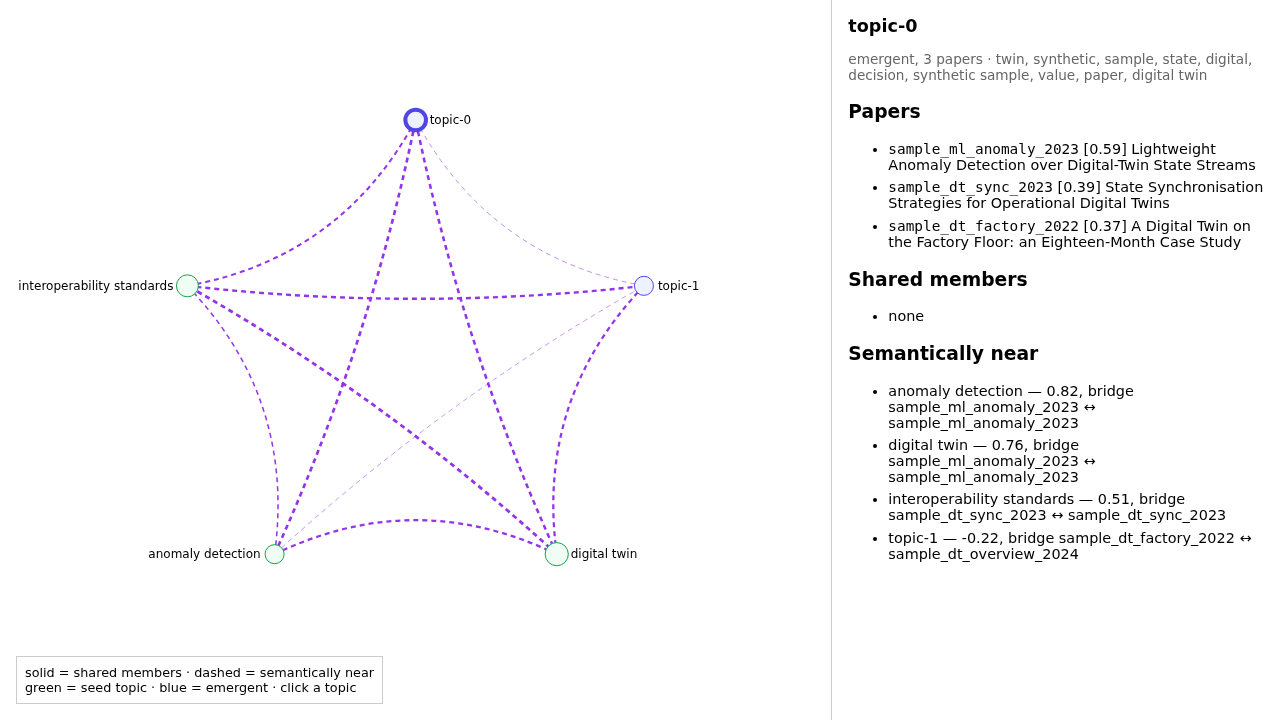
The recording above is the terminal half only; docs/DEMO.md has the full recording -- including
the browser segment pictured here -- as video and GIF.
🔑 The one rule
Asked to write a literature review, language models fabricate citations at rates measured in the double digits, and fabricated placeholder references have reached real published papers. Most tools answer this with retrieval, which makes fabrication unlikely. Unlikely is a different property from impossible: in a conventional retrieval-augmented pipeline the model is asked not to invent a reference, and nothing stands between a generated citekey and the rendered document. Chitragupta puts something there:
A citekey may only be used if it appears in your own
.bibexport and was picked up into the ledger by a real parse of a real PDF.
That sentence is enforced by architecture, not by prompt: the bibliography you export is the only way a source gets in, and one blocking check, the citation gate, is the only way a draft gets out. A gate failure loops back to drafting, not to you.
- What it is
- How it works
- Quickstart
- The enrichment layer
- Hardware requirements
- Documentation
- Acknowledgements
✍ What it is
Chitragupta is a local-first system for co-authoring scholarly prose over a corpus you curated: a human and a language model write the same document by turns, each contributing where it is stronger. You curate the library, decide the scope, steer, and edit; the pipeline retrieves, drafts grounded sections, verifies every citation mechanically, and remembers the judgment behind the draft so that changing it months later is an edit, not a re-run.
You contribute in three ways, and each has a mechanical effect rather than a rhetorical one:
- Declare structure before drafting. An optional outline carries, per section, a brief the draft must obey but never show, your own prose as claims to be grounded, and the exact retrieval queries to run verbatim instead of letting the model invent sub-themes.
- Write prose directly. A section written by hand is a first-class input: the pipeline grounds it against the corpus, and any sentence it cannot ground is dropped and named back to you. That is deliberately the opposite of a tool that edits your draft.
- Edit what the model produced. A text fingerprint notices the draft moved, surfaces what went stale, and offers (never applies) one further retrieval round in which your own new wording is the query.
The design has a cost: the pipeline cannot cite a paper you have not catalogued, and "the corpus does not contain this" is a frequent and deliberate answer. You supply the argument and the corpus supplies the warrant; where it cannot, the sentence does not ship.
🏗 How it works
Five phases along the spine, and two layers beside it. You own phase 1; nothing reaches phase 5 without passing phase 4.

Two properties of the spine alone make the guarantee hold, and both are structural rather than procedural:
- Phase 1 is the only entrance. Citekeys come from your reference manager's BibTeX export, synced into a small local ledger by a deterministic run: no LLM, no judgement calls, and the same bibliography in yields the same citekeys out. The pipeline never fetches a paper, never invents a citekey, and never renames one.
- Phase 4 is the only exit.
chitragupta draft gatesits on the single path between a draft and a rendered document. There is no arrow around it, and aFAILis treated like a failing test rather than a lint warning. What the gate proves is that every citekey is real; whether each cited paper actually supports its sentence is the review layer's business, below.
The two layers beside the spine hold the draft's working memory and its advisory checks:
- The dossier is the draft's externalised working memory, written as the draft is written: scope, who the reader is, the evidence kept, the candidates rejected and why, and what you steered in chat that the prose does not show. It makes the next revision scoped instead of a re-run, and is why "shorten section 3" three weeks later costs an edit instead of a rebuild (docs/DOSSIER.md).
- The review layer is ten advisory aids for a finished draft: does the cited paper say this (provenance), how much wording came from the sources (verbatim), what did retrieval surface that you never cited (coverage), and seven more, merged into one ranked worklist (agenda). None of them is a gate, and none may be promoted to one. Each is measured against something that can itself be imperfect (a parse, a retrieval ranking), and a check like that must inform you instead of blocking you (docs/REVIEW.md).
Ten skills sit behind phase 3, all obeying the same grounding rules:
five that write a draft (survey, thesis chapter, undergraduate textbook
chapter, hands-on tutorial, and a heavier multi-perspective
deep-research mode), three that change a draft that already exists,
one that assembles accepted units into a book, and one that draws the
figures the others hand it
(docs/GENRE.md). Before any draft exists,
chitragupta corpus discover maps what your corpus is about: its
topics, their papers, and the links between them
(docs/TOPIC-DISCOVERY.md; worked tours in
docs/EXPLORE-CLI.md and
docs/EXPLORE-WEB.md).
docs/DIAGRAMS.md draws this workflow thirteen ways (by depth, by genre, and in time order) and is where the figure above comes from. docs/GLOSSARY.md defines the working vocabulary in one page.
🚫 One thing the corpus layer does not promise
The corpus layer is deterministic in the sense that matters most (no
LLM, no judgement calls, same bibliography in, same citekeys out), but
it is not bit-reproducible with every parser. With the default
pdftotext backend it is: parsed text comes back byte-identical, every
ledger column stable except the last_synced timestamp.
With the opt-in docling backend and a worker pool, it isn't, and
the instability reaches the quotable passage, so the exact span
quoted from a source can change between runs. A snippet is the evidence
a judgement is recorded against, so an irreproducible snippet means an
irreproducible rejection; that is why this README states it openly. The
cause is Docling's behaviour under load, not anything this pipeline adds;
serial parsing ([parser].workers = 1, the default) has not been
observed to vary. The artifact-by-artifact contract and the measured
rates are in
docs/ARCHITECTURE.md.
Every artefact this README describes exists, committed, as pipeline output over a five-paper sample corpus: see examples.
🚀 Quickstart
Two ways to get a project directory, and everything from step 2 onward is identical either way. Pick whichever matches what you're doing:
1 2 3 4 5 6 7 8 9 10 | |
1 2 3 4 5 6 7 | |
1 2 3 4 5 6 7 8 9 10 11 12 13 14 15 16 17 18 19 20 21 22 23 24 25 26 27 28 29 30 31 32 33 34 35 36 37 38 | |
Every command that chain runs, every way to re-run one by hand, and all ten review-layer commands for checking a finished draft against its sources are in docs/CLI.md. Its section The full first run, step by step walks the whole sequence above and everything that follows it, in order.
🧠 The enrichment layer
Everything above works without it. The enrichment layer is a second,
optional pass over the same corpus that buys four things: layout-aware
parsing that yields quotable passages, semantic search that finds a
paper arguing your point in different words, topic modelling over the
whole corpus, and the topic graph that corpus discover and the
offline topic map read.
1 2 | |
It costs real time and disk (a first full-corpus parse is measured in
tens of minutes, and the enrich dependency group is several gigabytes),
so you build it deliberately. No genre skill builds it for you.
The skills read what is already there and fall back to the lightweight
default when it isn't. Inside the layer, every stage probes its own
prerequisites and reports ok, partial, skipped or error rather
than assuming. No stage needs an LLM API key; this repository
intentionally has none.
Which stage is worth the cost is docs/RETRIEVAL.md's question; what the topic stages produce and how to explore it is docs/TOPIC-DISCOVERY.md's.
💻 Hardware requirements
What the pipeline needs, not what it was developed on. The split that
matters is between layers: the corpus layer (sync, the citation
gate, keyword retrieval) is light enough for any laptop, and the
optional enrichment layer is what costs real disk and real time.
| Resource | Minimum (corpus layer only) | Recommended (enrichment layer in regular use) |
|---|---|---|
| Disk | ~1GB | 10-20GB+. The full venv alone is 6.0GB (torch pulled in twice over via sentence-transformers/docling, plus docling's own layout/OCR models); TeX Live adds several GB more |
| RAM | ~1-2GB | 8GB minimum, 16GB+ better. At ~3GB free, Docling on a 17-page PDF pushed the process to 3.6GB RSS and the host swapped 6.3GB; it finished, just slowly |
| CPU | 1-2 cores | 4+ cores. Without a GPU, Docling's layout inference and BERTopic's UMAP/HDBSCAN are CPU-bound, and more cores directly cut wall-clock time |
| GPU | none needed | none required. If one is present the installer detects it and torch is set up to use it automatically, worth ~4.7x on the parse |
| Network | once, for poetry install |
also for first-run model downloads (the embedding model, Docling's layout/OCR models) |
For a sense of scale at the top end, this project's own bibliography
(501 PDFs, 13,400 pages, 1.54GB) parses in about 4 minutes on a
96-core machine with four A40s, against 1h 56m serially on that same
host. On ordinary hardware a first full Docling parse is measured in tens
of minutes. A second run over an unchanged corpus costs close to
nothing either way, because every stage skips what hasn't changed. That
is what makes it safe to put sync on a schedule.
Every measured figure in this project comes from one of two reference
machines: the small machine (4 cores, 9.7GB RAM, no GPU) and the
multi-GPU machine (96 cores, 251GB RAM, 4x NVIDIA A40; the one in the
paragraph above). Treat each figure as that machine's, and expect yours
to differ. docs/PERFORMANCE.md has their full
specifications, what each setting costs, and the two install-time traps
worth knowing before you start (a CPU-only host pulling several GB of
unused CUDA packages, and a GPU host where torch.cuda.is_available()
comes back False).
📖 Research Citation
When Chitragupta is used in academic work, the following reference may be used:
1 2 3 4 5 6 7 | |
🗂 Documentation
This file is the overview: what the pipeline is, how to get it running, and what it needs. Everything else lives in one document per question, split by what you are doing: using the pipeline, or working on it. Which of those you are doing can change within a session, and the split follows the task rather than the person; CLAUDE.md is the one-screen router for that.
▶ Using it
🚀 Getting started
| Document | Answers |
|---|---|
| SOUL.md | One page: why this exists, the one invariant, and what it refuses to become |
| docs/FEATURES.md | What can it do for me? The whole capability surface in one place, written for someone deciding whether it fits: from getting a library in, through topic discovery, drafting and review, to what it deliberately does not do |
| docs/DEMO.md | What does running it look like? A short recorded pass through the spine, as video and GIF, made against the committed sample project |
| docs/GLOSSARY.md | The working vocabulary (citekey, ledger, dossier, gate, topic, review aid), each defined by what it is to you, grouped by when you first meet it. Read it once and every other document gets easier |
| docs/MIGRATION.md | How do I back up my drafts, restore them, or move a project to another directory, another computer or a container without parsing my library again? |
| docs/ZOTERO.md | How do I get my library and its PDFs into the shape this expects? Includes the attachment-path trap that silently leaves every entry without a PDF |
| docs/GENRE.md | Which of the ten skills writes what? How to pick a genre, what each one refuses to do, and why changing an existing draft never goes back through the genre skill |
| docs/FIGURE-DRAWER.md | How do I get a figure into a draft? What to ask for, what the figure-drawer skill writes, a worked example, and what to do when a figure breaks the PDF |
| docs/WRITING-PROCESS.md | How do I go from a bare corpus to a finished draft, or a whole book, in order? The step-by-step walkthrough tying the rest of this table together |
| docs/CLI.md | What commands are there, what flags does each take, and which interpreter does it need? |
| docs/CONFIG.md | What settings exist, what values does each accept, and what is the default? Starts with a minimal config.toml. Includes [parser].backend, which decides how faithfully your PDFs are read |
| DOCKER.md | How do I run this in a container? |
🔭 Understanding the system
| Document | Answers |
|---|---|
| CLAUDE.md | One screen: which of the two agent guides applies to the task you are about to start, and the one rule that binds both |
| AGENTS.md | The rules an agent drafting with this pipeline must follow; above all, never fabricate a citekey |
| docs/ARCHITECTURE.md | What runs, what does each part write, which parts are optional, and why do some commands need the venv? |
| docs/DIAGRAMS.md | The workflow drawn thirteen ways: six by depth, three by genre, two in an appendix, two for topic discovery. Pick the one that matches what you already know |
| docs/LADDERS.md | Where does the pipeline choose between two ways of doing one job? Every ladder it walks for you and every tier you pick yourself, and what the bottom rung costs |
| docs/RETRIEVAL.md | BM25, embeddings, topic models -- which one answers my question, and which is worth building? |
| docs/DRAFT-ITERATION.md | What does a draft's dossier hold, and how do I change a draft weeks later without re-running the pipeline that produced it? |
| docs/USER-EDITS.md | I edited a draft myself, by hand. How do I hand it back so the pipeline picks the edit up cleanly, and what does it check for when I do? |
| docs/PROMPTS.md | What does the prompt sent to the model contain, layer by layer, for a single-context genre skill and for the multi-agent deep-research skill, and why don't the two look the same? |
⚙ Choosing settings
| Document | Answers |
|---|---|
| docs/PERFORMANCE.md | What does each setting cost? Every measured figure in one place, organised by setting |
| docs/PDF-PARSER.md | Which PDF backend should I use, why were two dropped, and why was each newer candidate not adopted? |
🔍 Reading the output
| Document | Answers |
|---|---|
| docs/CITATION-PROVENANCE.md | What does the provenance report say, and how do I read it? |
| docs/PLAGIARISM.md | How much of a draft's wording came from its sources? What the verbatim overlap/scan checks catch, and (just as important) what they cannot see, since these drafts are LLM-written and the tier that catches a genuine restatement does not run everywhere |
| docs/WRITING-STANDARDS.md | What prose standards do the genre skills follow, and where in the technical-communication literature do they come from? |
🤝 Working on it
| Document | Answers |
|---|---|
| docs/RENDERING-FLOW.md | How does a draft's citation resolve into a rendered bibliography, which of four possible stores does a .tex fragment's citation defer to, and what happens to a figure on the way through? |
| docs/REJECTION.md | Why is turning a source down the judgment this pipeline is most careful about? The reasoning behind a retrieval change that was built and then withdrawn, and what was kept from it |
| docs/TOKENS.md | Where do a run's tokens go, which of them get billed once and which get billed every turn, and how do I measure that without paying for a full run? |
| docs/DESIGN.md | Why does this refuse what it refuses? The hard constraints, the conflict policy when two runs collide, and the failure analysis behind both |
| docs/REQUIREMENTS.md | What must a grounded long-form writing system do, how do closed- and open-source tools compare against that bar, and where does this pipeline stand against its own requirement set: what's built, what was measured and declined, and what's left? |
| docs/PARALLELISM.md | How does the parallel parse work, what is each component for, and what is planned next? |
| docs/GROBID-CITATION-GRAPH.md | A proposal, not a plan. What would it take to build a corpus-internal citation graph, and is it worth a JDK and a long-running service? |
| docs/TLDR.md | What does chitragupta draft tldr cache today, and (parked, not built) what would it take to generate it unattended: the two-path design, what was measured on the real corpus, and why it's waiting on an acceptance workflow that doesn't exist yet? |
| docs/AUTO-IMPROVEMENT.md | Built, one step declined. The pipeline assembles its own worklist (review agenda) and agenda-reviser attempts the mechanical repairs: what was built, and what it has to satisfy. Normative, and carries no argument |
| docs/AUTO-IMPROVEMENT-RATIONALE.md | Why that loop, and where its line falls: why every quality signal here currently ends in prose a human must act on, what a machine may never repair, and the one documented rule this cannot satisfy without the user's approval |
| docs/FIGURE-ROADMAP.md | Discussion notes, partly implemented (the house style block, figure sync, exemplars). Where figure quality stands today, the gap between the current layout metaphors and what a CS/SE textbook needs, and a build order for closing it |
| docs/HOUSE-STYLE.md | Why prose is the axis a machine improves best, why a readability score is the wrong target, and which of your preferences should outlive the draft that prompted them |
DEVELOPER.md (git checkout only; chitragupta init deliberately does not scaffold it) |
How do I run the tests, where does everything live, and what is unbuilt? |
DOCKER-DEVELOPER.md (git checkout only) |
How are the Docker images themselves built and verified before a release? |
DEVELOPER-AGENTS.md (git checkout only) |
The rules an agent changing this repo must follow: test policy, the local check suite, code standards, commit/PR/release conventions |
| docs/CODE-STANDARDS.md | What must the code itself look like? The clean-code checklist mapped rule by rule, the two size rules that are machine-checked as a ratchet, why they count statements rather than lines, and why the rest is left to review |
| docs/INSPIRATION.md | What did this project borrow, and from whom? Every external idea, what was taken, and (where the licence requires it) what was deliberately not |
| docs/EXPORT-ZOTERO-GROUPS.md | Discouraged, and says so. How the one script that reads zotero.sqlite directly recovers collection labels when Better BibTeX cannot, which two project rules it bends to do it, and why you should use Better BibTeX instead |
Every prose document ships in the release archive (everything under
docs/, plus SOUL.md, CLAUDE.md, AGENTS.md, DEVELOPER-AGENTS.md
and DEVELOPER.md), as do the genre skills in .claude/, .agents/ and
.opencode/. Only this repo's own machinery stays behind: tests/,
bench/ (the measurement harness and its raw timings), plans/,
.github/, .gitignore and a few root-level CI and tooling files.
🙏 Acknowledgements
This project borrows from several others: the deep-research skill's
7-phase method, the clean-code checklist its own code standard is written
against, and the harness-engineering reading list behind much of
.claude/. Each is credited, with what was taken and what deliberately
was not, in docs/INSPIRATION.md.