🖍 Drawing a figure: the figure-drawer skill¶
Status: guide. Written 2026-10-06 (#1027).
Written for anyone who wants a figure in a draft: a pipeline, a
control loop, a taxonomy or an architecture, drawn once as TikZ for
the PDF and once as ASCII for every other format. Assumed: you have
a draft under content/drafts/, or are about to have one from a genre
skill (GENRE.md). Not covered here: the figure rules
themselves. The two-form contract, the marker syntax and originality
are WRITING-STANDARDS.md §10, and what makes
the TikZ half good is TIKZ-STYLE.md. This page says
how the skill applies them and when it runs.
🧭 Table of contents¶
- What it is, and what it is not
- Three ways it runs
- What you get
- What it does, step by step
- A worked example
- Thesis fragments
- What it never does
- Why the genre skills keep a short figure step
- When something goes wrong
⚖ What it is, and what it is not¶
figure-drawer owns how a figure is drawn: the layout metaphor,
the scaffold it starts from, panel letters, the ASCII twin, the compile
probe and the geometry review. It does not decide whether a draft
gets a figure. Each genre sets its own threshold, from the tutorial
(draw every figure that makes a step clearer) to the survey (rarest of
all, since the comparison table usually does the work). deep-research
draws no figures.
It also never presents a draft. It draws one figure, checks it, and returns to whichever skill called it. The gate, the render, the prose check and the verbatim scan stay with that skill.
🚦 Three ways it runs¶
| Who calls it | When | What happens after |
|---|---|---|
A genre skill: survey-writer, tutorial-writer, textbook-chapter-writer, thesis-chapter-writer |
mid-draft, once the genre's figure step decides a figure is warranted | back to the genre skill's next step, which places the marker and caption, gates and renders |
draft-reviser |
you asked to redraw or fix a figure in an existing draft | back to draft-reviser, which logs the change in revisions.md |
| You, directly | you asked for a figure in an existing draft | a revision: the session continues in draft-reviser's write-back and gate steps |
You never name a skill. Ask in ordinary words and the right one answers. A direct request needs three things: which draft, where in it, and what the figure shows.
1 2 3 | |
1 2 | |
1 2 | |
On a direct request the genre's threshold does not apply, because you asked for the figure. With no draft to put it in, the skill says so and stops.
🎯 What you get¶
Two files under the draft's topic directory, plus one line (or block) in the draft that names them:
| Draft | In the draft | Files |
|---|---|---|
.md (survey, tutorial, textbook chapter) |
<!-- figure: figures/<name> --> on a line of its own, a caption line directly below it if the figure warrants one, and <!-- figureref: <name> --> wherever prose points at it |
figures/<name>.tex and figures/<name>.txt |
.tex (thesis chapter) |
\input{figures/<name>.tex} then %figure: figures/<name>, inside a hand-written figure float with \caption and \label when captioned |
the same pair |
The renderer puts the TikZ in the tex and pdf outputs and the ASCII
form, in a code block, in md, html and docx. Nothing writes
"Figure 3" by hand: the renderer, or your thesis's own LaTeX, numbers
it.
A flat draft (content/drafts/<slug>.md with no topic directory) would
put its figures in content/drafts/figures/, shared with every other
flat draft. The skill asks whether to move the draft and its dossier
into a topic directory first, or to drop the figure.
🪜 What it does, step by step¶
Each step names the document that owns its rule.
- Looks before drawing.
python -m chitragupta.draft figures
   <citekey>
lists a cited paper's figures, with a crop of each. Seeing how a concept is usually drawn is fine. Reproducing one is not (AGENTS.md, WRITING-STANDARDS.md §10). - Commits to a layout metaphor and copies its scaffold from
assets/tikz/: pipeline, map, layered stack, control loop, branching tree, hub-and-spoke or zoned spine. It re-labels the scaffold, leaves the house style block alone, and runspython -m chitragupta.figure syncon the copy to keep that block current (TIKZ-STYLE.md). - Letters the panels
(a),(b),(c)in both forms, if the figure has more than one. - Writes the ASCII twin in §10's 7-bit alphabet, showing the same boxes, arrows and letters.
- Keeps every citekey out of both files, because the gate reads
the draft and does not follow
\input. - Probes and compiles.
kpsewhich tikz.styfirst. If TikZ is missing, it writes no pair: the ASCII goes inline instead (a fence in Markdown,verbatimin a thesis fragment), with no marker. Otherwise it compiles the figure alone in a minimal document withpdflatex, because a broken figure fails the whole PDF render. - Reads the geometry.
python -m chitragupta.review figure <draft>reports overlaps, protrusions and hand-loaded libraries. It is a review aid, never a gate (REVIEW.md). - Looks at the real render. The probe is a bare article class
under
pdflatex, but the pipeline's own PDF is LuaLaTeX at the draft's body font, so labels can wrap and gaps close differently there. Once the draft carries the marker, it renders the PDF and checks the page that holds the figure against the same pre-flight list. This needspandoc, LuaLaTeX andpdftoppm(poppler), whichchitragupta install os-depsinstalls on Linux; without them, or in a harness that cannot view an image, the skill skips the look and says so. - Returns the two paths, whether the probe passed, and whether it checked the rendered page.
The skill reads .claude/skills/figure-drawer/references/figures.md (one
copy, whichever harness runs it) only when a step sends it there: which
metaphor fits, a worked panelled figure, fitting a figure without scaling it,
and an annotated exemplar.
🌱 A worked example¶
Step 4 of a potted-plant tutorial wires a simulated pot to a digital twin that predicts when the soil will dry and waters it. The request:
1 2 | |
The cycle closing is the whole point, so the metaphor is a control
loop, and the drawing starts from assets/tikz/control-loop.tex.
Two zone cards separate the physical side from the twin, and the one
edge that crosses back (the twin watering the pot) is drawn as the
loop's return:
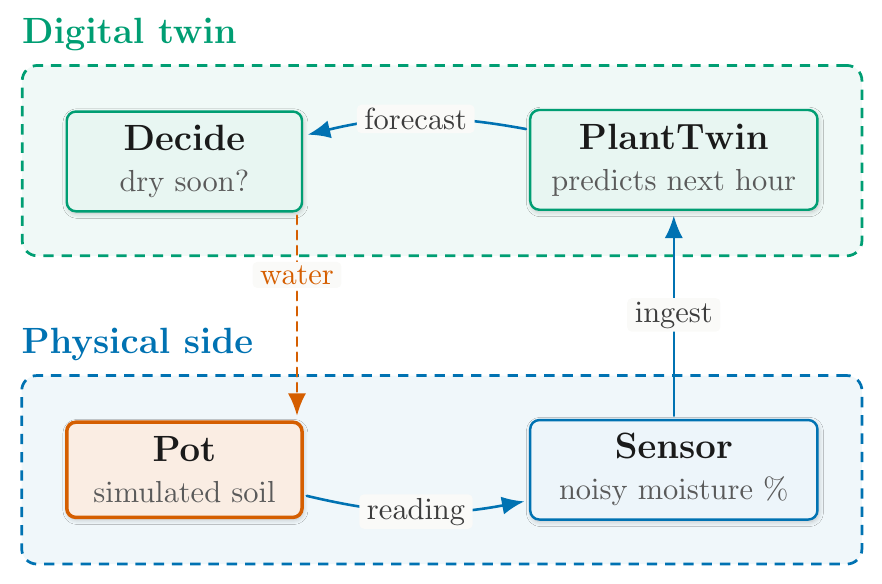
The figure's own body, below the house style block the scaffold carries:
1 2 3 4 5 6 7 8 9 10 11 12 13 14 15 16 17 18 19 20 21 | |
and its ASCII twin, which is all a reader of the md, html or docx
output sees:
1 2 3 4 5 6 7 8 9 10 11 12 13 | |
The first draw did not pass the pre-flight list in
TIKZ-STYLE.md: the two zone cards overlapped, "moisture"
hyphenated inside its box, and the return edge ran through the
"Physical side" title. Wider boxes, more vertical room and an offset
return edge fixed all three, with no change of scale. After that,
review figure reported no layout findings and figure sync --check
reported the block current.
The probe is not the last word. A second figure, a five-layer stack for a chapter on the digital twin ecosystem, passed its probe and still printed in the chapter's own PDF with "Dashboard" hyphenated inside its box and an arrow running through a layer title, because that PDF sets labels in a larger body font than the probe does. Step 8 exists for that case: wider boxes and arrows anchored to each card's right edge fixed it, checked on the rendered page itself.
🎓 Thesis fragments¶
A thesis chapter is a .tex fragment that you \input into your own
thesis, so two things are yours to act on:
- TikZ libraries. When the render prints a
[tikz-libraries]line, add the\usetikzlibrary{...}it names to your thesis preamble, beside\usepackage{tikz}. Keep the figure's own\usetikzlibraryline and add nothing else about loading, such as flag-clearing or a hook save and restore (TIKZ-STYLE.md says why). - Unicode. When it prints a
[unicode]line, copychitragupta-unicode.stynext to your thesis and load it.
The fragment never writes \renewcommand{\thefigure}: your thesis's
own counter numbers the figure. WRITE-A-THESIS-CHAPTER.md
covers the rest of putting a fragment into a thesis.
🚫 What it never does¶
- Never puts a citekey in a figure file. Attribution goes in the prose beside the figure, where the gate can see the key (CLAUDE.md's one rule).
- Never reproduces a source figure, in either notation.
- Never scales a figure to fit. No
\resizebox, noscale=. A figure that does not fit gets a different layout. - Never gates.
review figureandfigure sync --checkreport;python -m chitragupta.draft gatestays the only gate. - Never presents a draft. It returns to its caller.
🧱 Why the genre skills keep a short figure step¶
Skills are picked by their trigger descriptions, not called by name, so
a step that says "now use figure-drawer" depends on the model actually
loading it, in Claude Code, Codex and OpenCode alike. Each genre's
figure step therefore keeps whatever must hold even if that handoff is
skipped:
- its threshold for drawing at all;
- its output shape (the marker, or the thesis's
\inputand float); - the TikZ probe and the compile check, with its inline fallback;
- an originality line;
- no citekey inside either figure file.
Everything else lives once, in figure-drawer.
tests/test_skill_figure_step.py pins each stub and fails if a rule
that moved comes back into a genre skill.
🩹 When something goes wrong¶
| Symptom | Likely cause | What to do |
|---|---|---|
| The figure came back as ASCII inline, with no marker | kpsewhich tikz.sty found no TikZ on this host |
install TeX Live's texlive-pictures, then ask for the figure again |
| The whole PDF render fails | a figure file does not compile | ask to fix that figure; the skill re-runs the probe |
| A label hyphenates or an arrow crosses a title in the PDF, though the probe looked fine | the PDF sets labels in the draft's body font, larger than the probe's | widen the boxes or move the edge, and check the rendered page again |
| Labels look small in the PDF | the draft wraps the figure in \resizebox |
remove the wrapper and ask for a re-layout (TIKZ-STYLE.md) |
review figure reports nothing for a busy figure |
its nodes have no names, so nothing was measured | name every node |
| A render warns that the figure's style block is stale | the block predates the installed one | python -m chitragupta.figure sync <file> |
Your thesis build fails on of in a node position |
the TikZ library is not loaded in your preamble | add the [tikz-libraries] line's libraries to it |
| A survey asked for a figure and got none | the survey's threshold: the comparison table usually carries that structure | ask directly if you still want one |