🕸 Explore the Graph — Web
Status: guide. Written 2026-09-07. TOPIC-DISCOVERY.md is the reference for how every number here is computed; EXPLORE-CLI.md is this page's terminal twin, and every view below names the command that answers the same question there.
Written for the reader someone handed the exported app directory, who wants to know what the controls do without reading a design document first. It is also for you, with a synced corpus in hand, deciding where the next draft starts.
The screenshots come from two corpora: a real 131-topic, 497-paper library, and the five-paper sample project this repository commits so every walkthrough has a reproducible subject. Each caption says which.
🧾 Getting the app in front of you
1 | |
Open topicapp/index.html straight from disk. The directory is
self-contained by construction: it needs no server, no install and no
network, and it keeps working after the corpus that produced it has
moved on. Nothing you do in the app writes anything back.
⚖ What the pipeline computes, and what the app computes
The app used to derive its analytics in the browser; today almost all
of them are computed once, in Python, by the topic-graph enrichment
stage (networkx and scipy over data the stage already holds) and stored
in content/topic_graph.json, which both the app and the terminal
read. This is why the two surfaces agree to the digit. Any number
either one shows is in the artefact, and shared case files under
tests/webapp/ pin every runtime that computes or consumes it to the
same answers.
Computed in the pipeline and stored in the artefact:
- the two edge families themselves (overlap edges gated by the
hypergeometric test, via scipy, and mutual-top-k semantic edges), plus
the agglomerative merge
hierarchy(scipy); edges_withheld: the pairs the gate tested and refused, so the absence verdict quotes the stage instead of recomputing it;analysis: per topic, per family, the degree, ego density, and Burt's effective size and constraint (networkx's weighted structural-holes measures), which give the panel its theme-or-bridge reading;communities: MCL partitions of each family at every value the inflation slider can take (a numpy port of the app's own clustering), behind the disagreement grid;paths: next-hop matrices from one Dijkstra per topic per family (networkx), so a path in either surface is a walk over data already on hand and needs no search.
Computed in the app, deliberately, because it is a function of the live view and not of the corpus:
- all rendering and interaction: the cytoscape canvas, pan/zoom, hover highlighting, tooltips, chips, type-ahead;
- click-to-latch node focus: a click highlights a node's neighbourhood
and holds it past
mouseout, so reading the side panel does not cost the highlight; released by re-clicking the node, clicking empty canvas, or Esc (which closes an open type-ahead first, then an open filter picker, and never touches pinned chips), and reachable from the keyboard via the panel's own topic links; - the resolution slider's cut of the stored merge tree, and the nested circle layout of the groups it produces;
- the ego view's concentric ring placement, hop bounds and dim-or-hide context, which change with every pin;
- papers-as-nodes expansion and its bridge highlighting, a function of which topics are opened;
- the ungrouped view's layout (a deterministic circle refined by
cytoscape's
cose), which was weighed for precomputation and deliberately left in the app because coordinates are presentation, not a corpus claim; - fallbacks: an exported app from an artefact that predates a stored field computes that field in the browser exactly as it always did, pinned to the pipeline by the same case files, and its panel captions say which of the two it is showing.
🗺 The grouped opening view
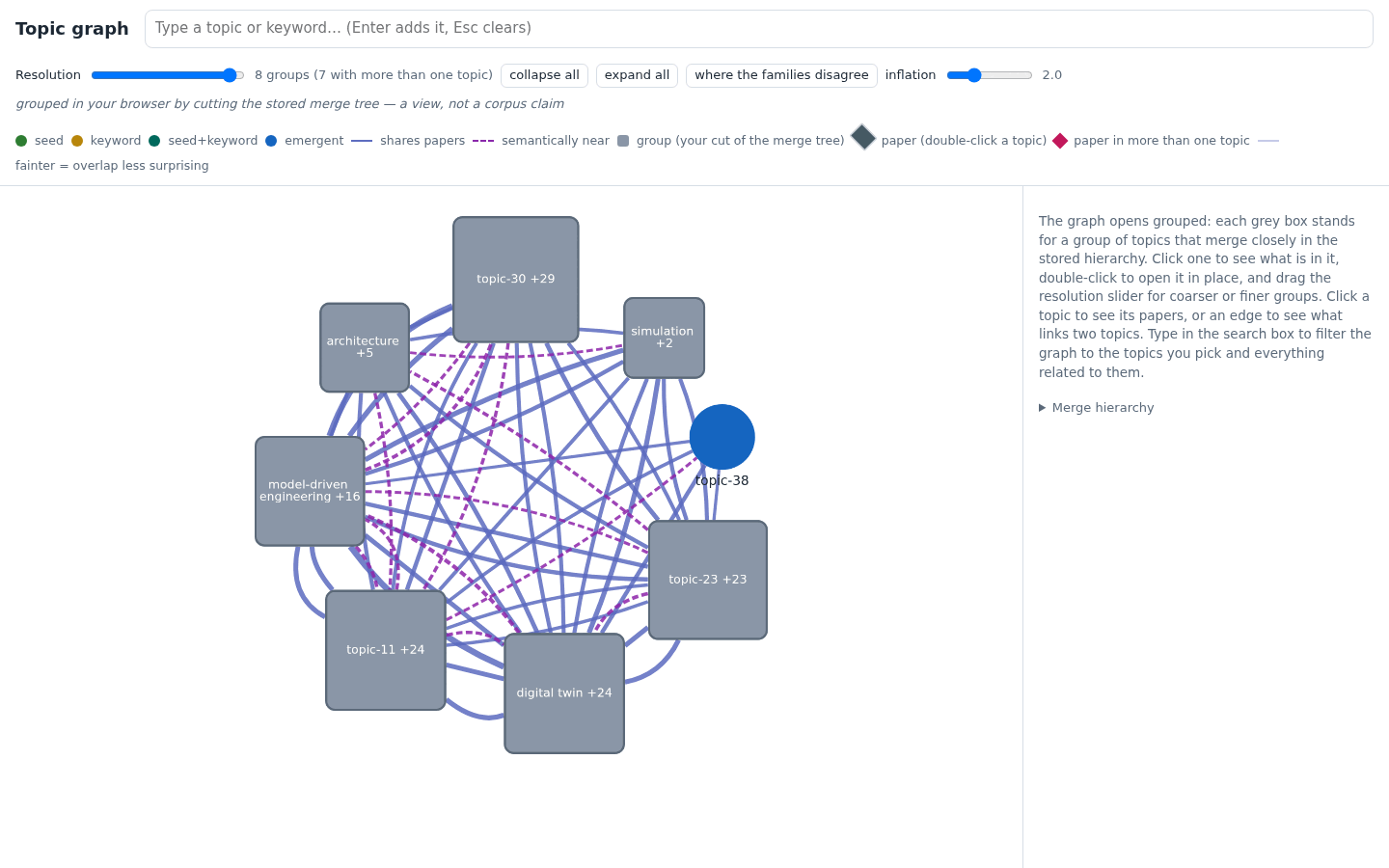
Real corpus. A 131-topic graph drawn loose is a hairball, so the app opens at a cut of the stored merge tree yielding roughly eight groups, each collapsed to one grey box carrying its member count. Edges between boxes are bundles, one per group pair per family: solid for shared papers, dashed for semantic nearness, and never fused. Click a box to list what is in it; double-click to open just that one in place.
The sidebar's collapsed "Uncovered seeds" panel lists the seed phrases
no topic covers (the same uncovered list the terminal's topic map
reports) and hides itself when every seed found a home.
Terminal: chitragupta corpus discover, and --groups 8 prints
this very cut.
🎚 The resolution slider
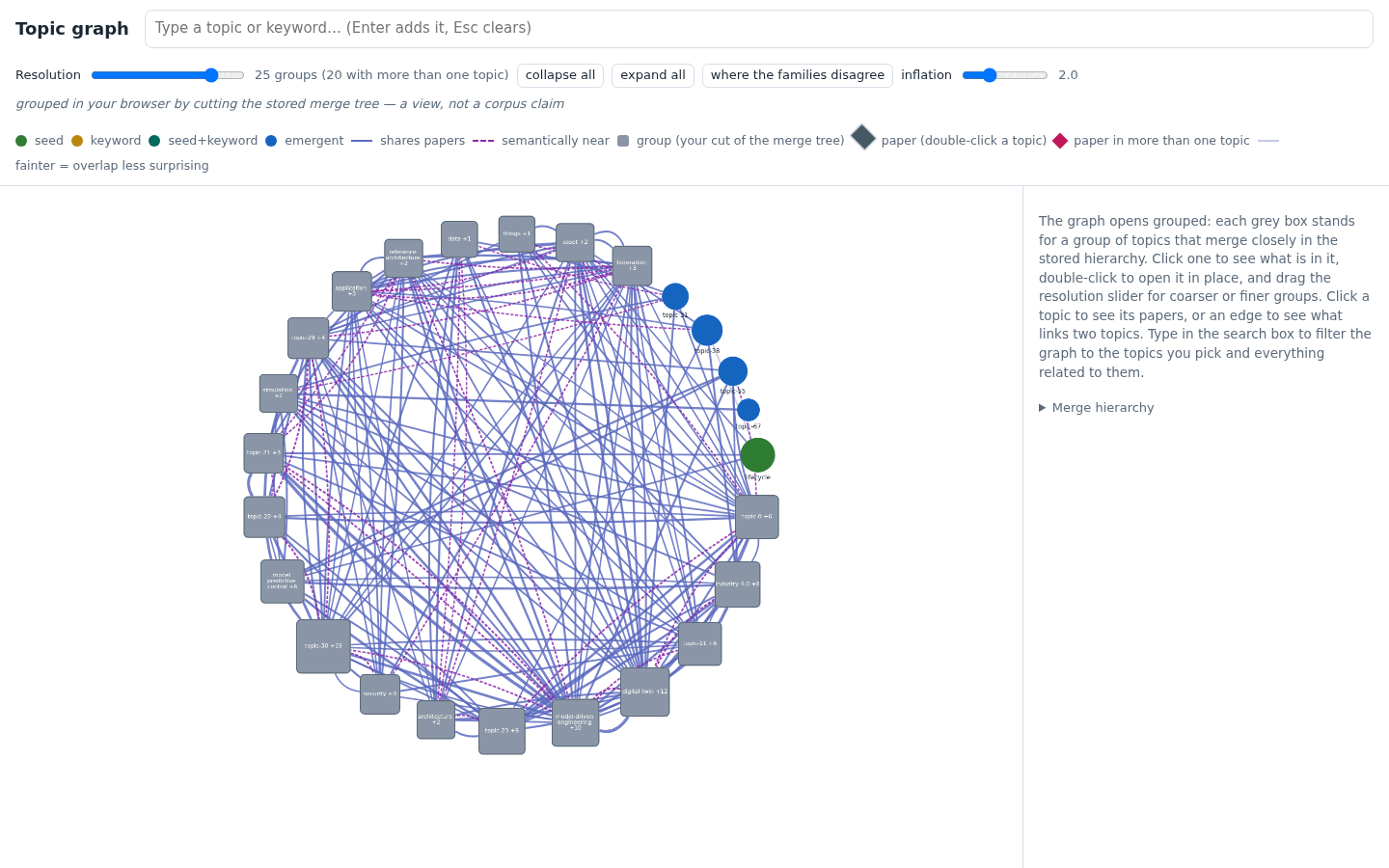
Real corpus. The slider walks the same merge tree from one group to no grouping at all; every position is a cut that actually exists in the stored hierarchy, so the same position always gives the same groups. You can use it as a table of contents that zooms continuously: start at eight chapters, slide until the section you care about becomes its own box, then open it.
Terminal: chitragupta corpus discover --groups N.
🞋 Pinning topics: the ego view
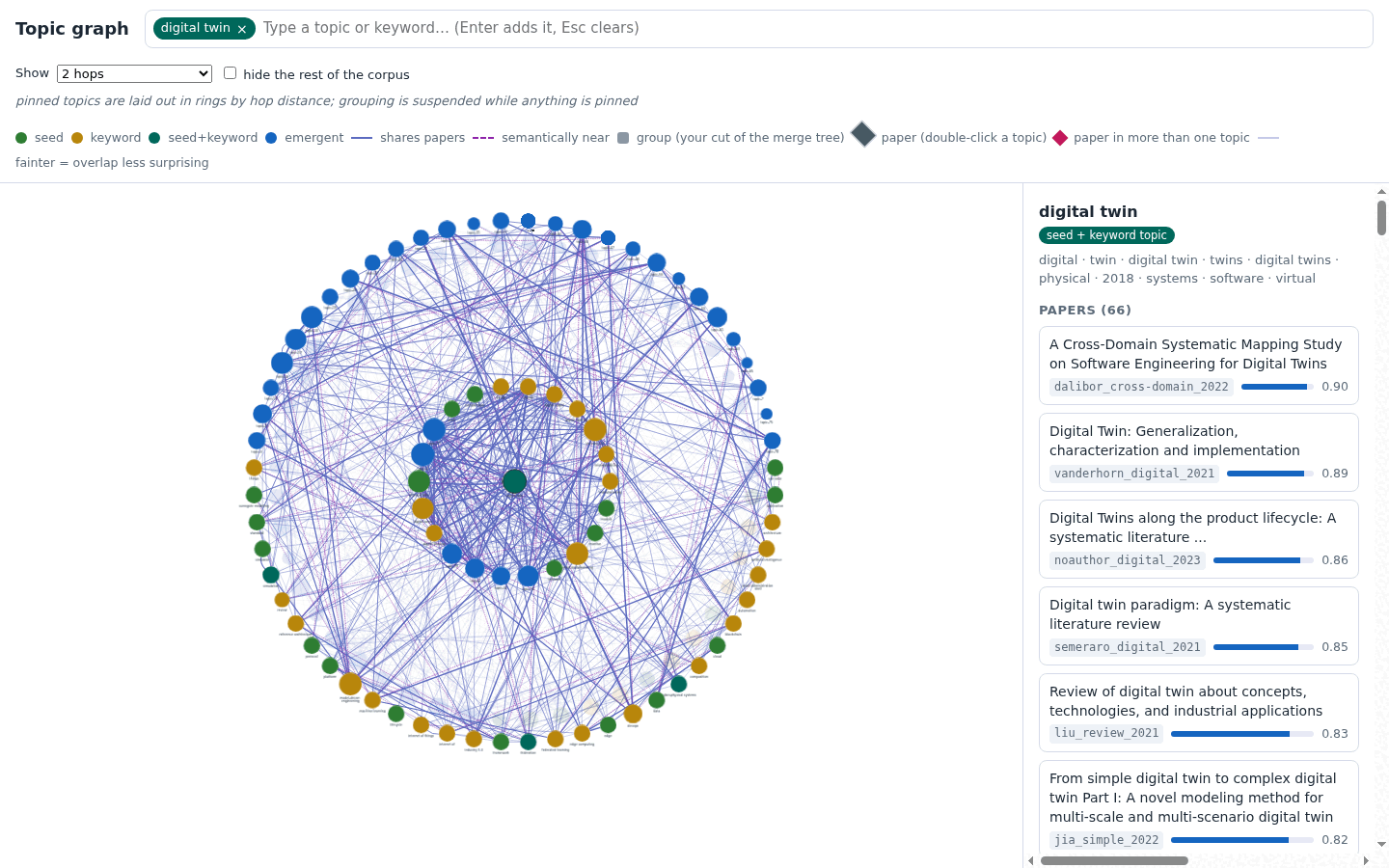
Real corpus, "digital twin" pinned. Type in the search box (labels and each topic's own terms both match), Enter pins the topic as a removable chip, and several chips compose. The whole corpus stays drawn, with context dimmed instead of deleted, so you keep your sense of how much of the corpus your selection is. The neighbourhood lays out as rings by hop distance: one hop answers "what is next to this", two answers "what would a chapter around this have to cover". The panel lists the pinned topic's papers with their ledger detail, and under them the topic's stored brokerage numbers (is it a theme or a bridge?), read from the artefact.
Terminal: chitragupta corpus discover "digital twin" for the
papers, links and brokerage; --hops 2 for the rings themselves.
🤝 Where the two families disagree
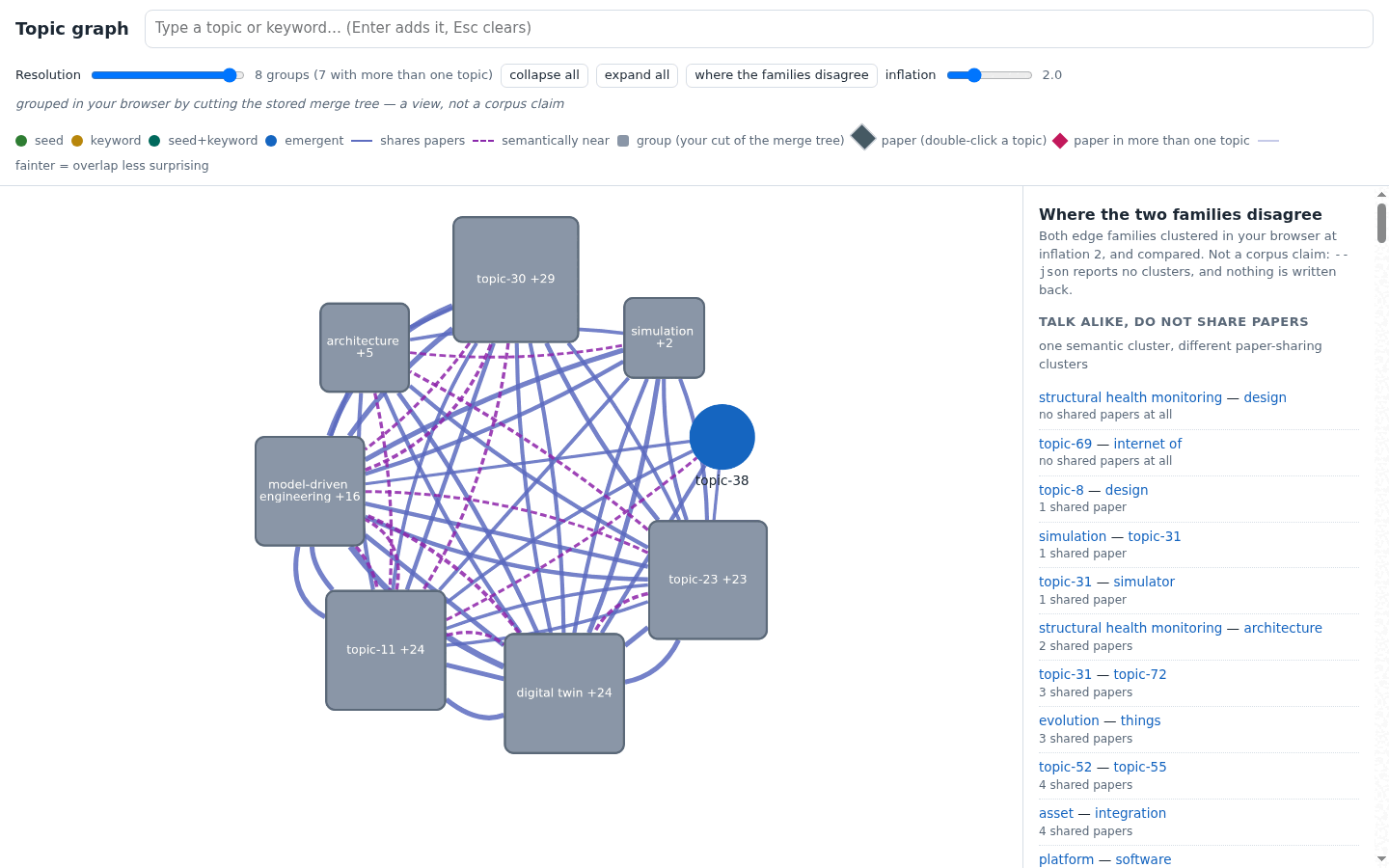
Real corpus. The button shows where the two families' stored MCL partitions split. Two topics in one semantic cluster that share no papers are a literature that has not met itself: the observation a survey wants to open with. The panel names the inflation it used and says the partitions come from the artefact; the plain-terms section explains what moving it means. While the grid is showing, releasing the slider re-reads at the new inflation.
Terminal: chitragupta corpus discover --clusters [--inflation X].
🛤 The path between two pinned topics
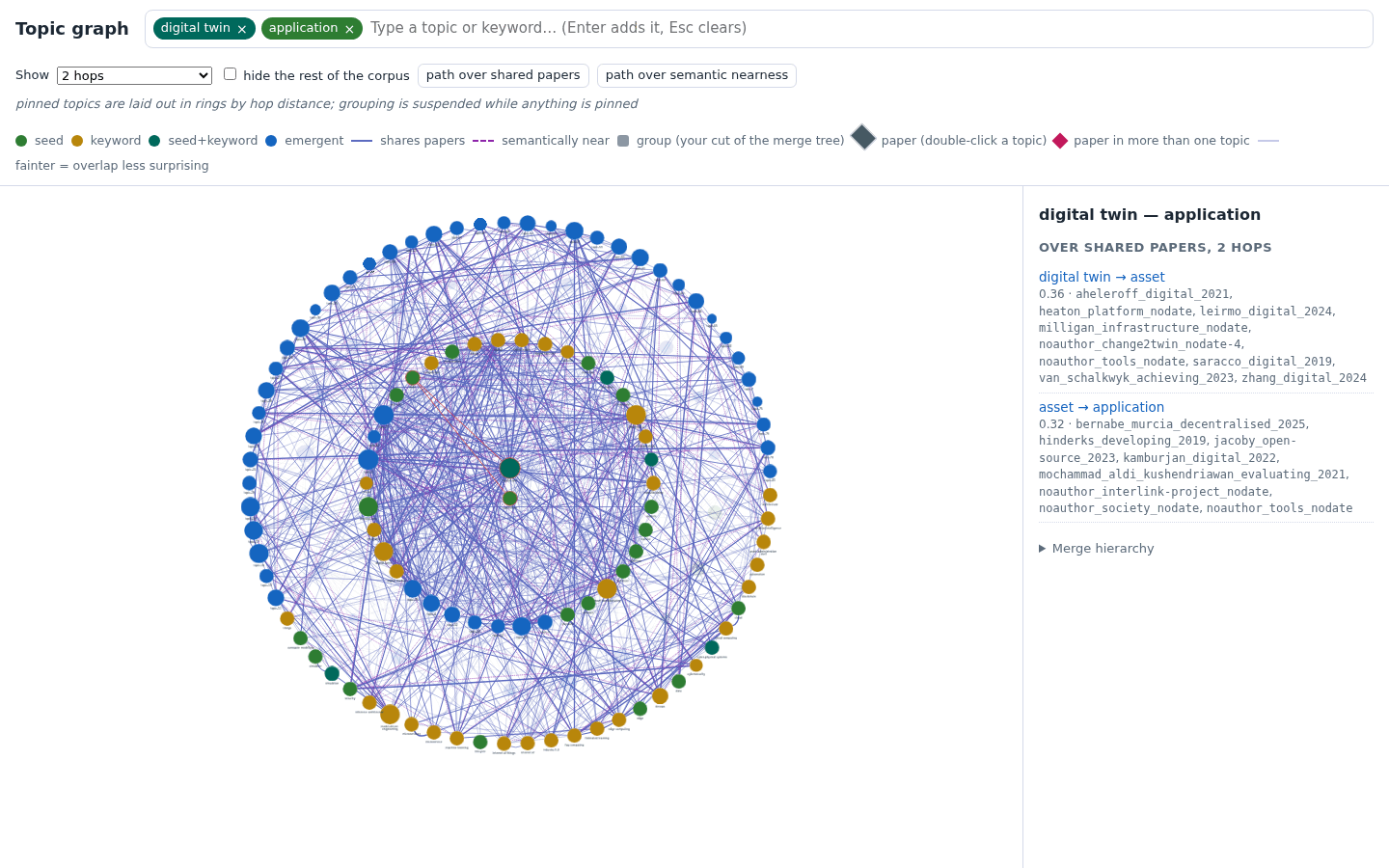
Real corpus, "digital twin" and "application" pinned. With exactly two chips pinned, two buttons appear, "path over shared papers" and "path over semantic nearness"; the app never fuses them into one weight. The chain is a walk over the artefact's stored next-hop matrices, every hop carrying its evidence (shared citekeys, or the bridging pair), so the whole route is explainable by naming real papers. "No path over semantic nearness" is a real answer, and often the interesting one.
Terminal: chitragupta corpus discover --path "A" "B" --family
overlap|semantic.
🚫 Why is there no edge here?
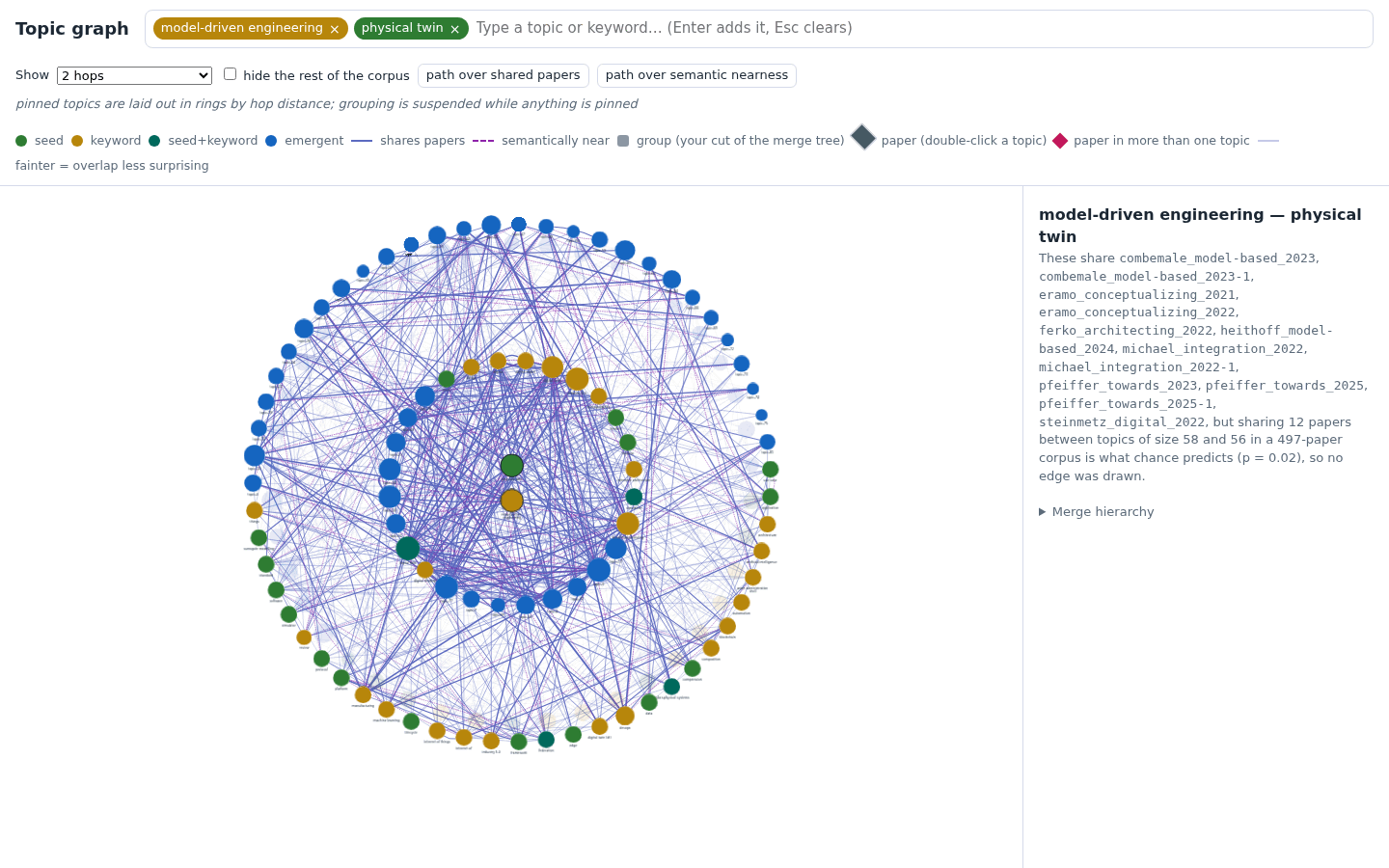
Real corpus, "model-driven engineering" and "physical twin" pinned.
This is the most instructive answer the app gives. These two topics
share twelve papers and still have no overlap edge, because sharing
twelve papers between topics of size 58 and 56 in a 497-paper corpus is
what chance predicts (p = 0.02), and the hypergeometric gate refuses
edges chance explains. The app reads the refusal the pipeline stored
(edges_withheld, beside the edges it drew) and says it in words.
Nothing else in any view shows the gate's reasoning.
Terminal: chitragupta corpus discover --why "A" "B", which also
prints the one number the app cannot show, the gate's stored threshold.
💠 Papers as nodes
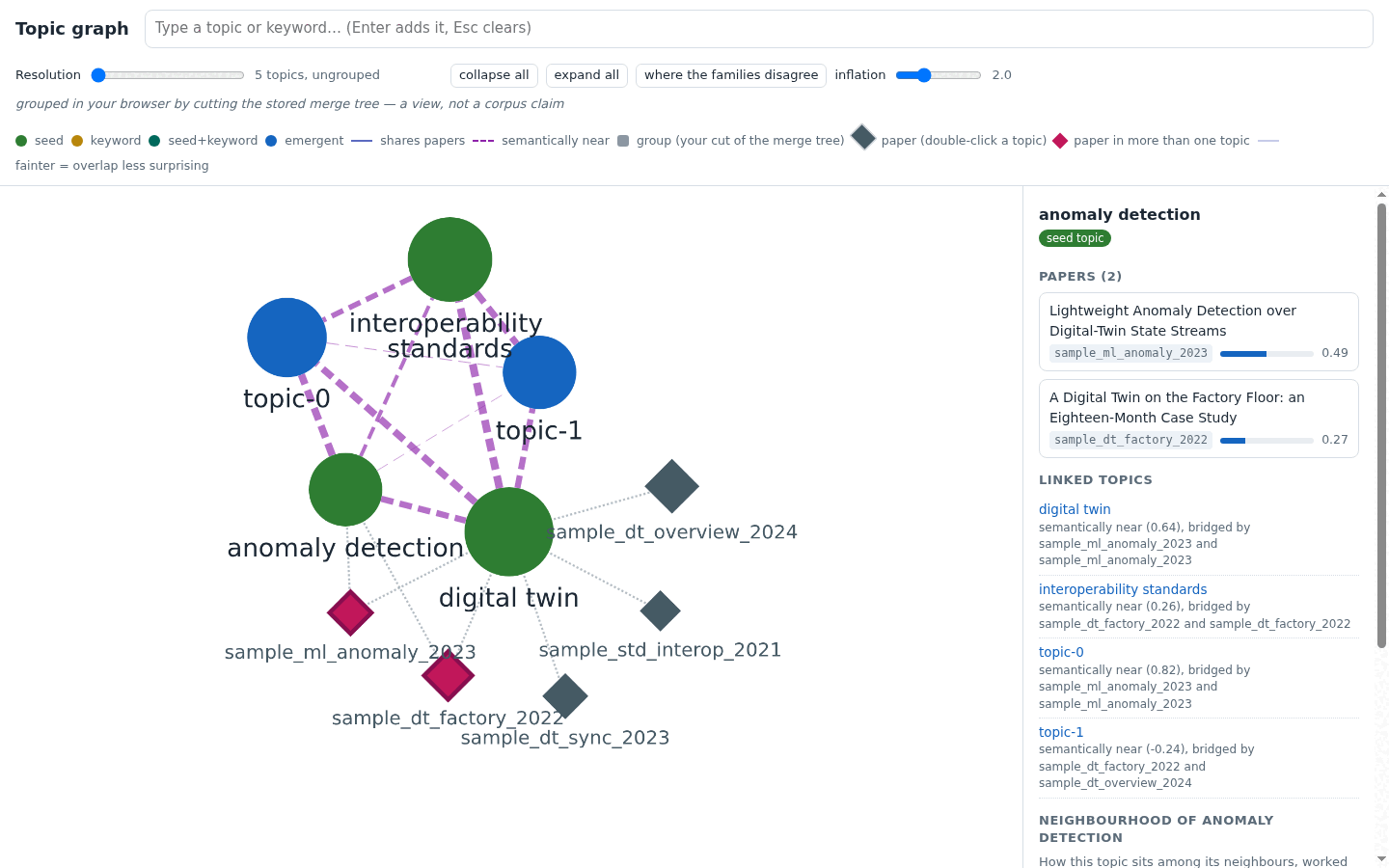
Sample corpus, both seed topics opened. Double-click a topic and its member papers join the canvas as diamonds, labelled by citekey, with the ledger title on hover. A paper held by more than one opened topic is drawn once, linked to each, and highlighted, so the bridge becomes a shape instead of a citekey repeated in two panels. Expansion is opt-in and capped at three topics at a time.
Terminal: chitragupta corpus discover --paper CITEKEY for one
paper's topics; --compare "A" "B" for the bridges between named
topics, with their full ledger entries, which the app payload cannot
even carry.
🏷 Filtering by where a topic came from
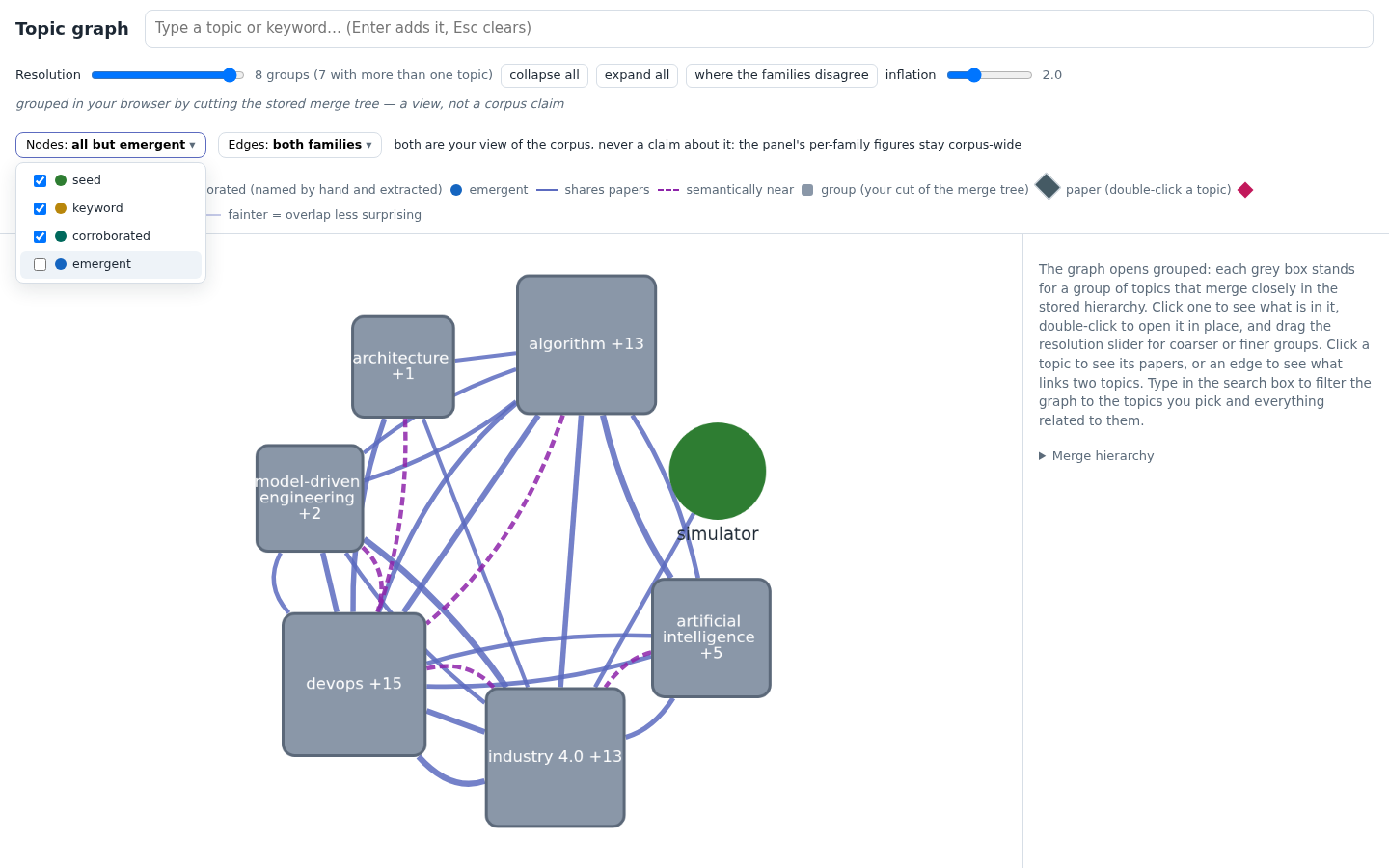
Real corpus, emergent unticked. The Nodes picker says what is on
the canvas before you open it ("all 4 origins", or "all but emergent")
and opens to one row per class: seed (you wrote the phrase in
content/seed_topics.toml), keyword (the extractor proposed it into
content/keywords.toml), corroborated (both files name it, so two
independent sources agree), and emergent (the topic model found it
on its own). Ticking classes off is how you ask "show me only the
literature I went looking for", or only what the corpus proposed back.
The filter moves the whole view together: the type-ahead stops offering what is not drawn, a pinned topic whose class goes out is un-pinned, a merge row naming a hidden topic leaves the hierarchy panel, and a group box is re-labelled from the members still on the canvas instead of leading with a topic you filtered away. It never touches the corpus's own arithmetic. The stored merge tree is not recut, and the absence verdict and withheld-edge counts stay corpus-wide, because they are statements about the corpus and not about your current view. Unticking the last class is refused: an empty canvas reads as an empty corpus.
The two views computed from corpus-wide stored analysis stay corpus-wide and say so: the disagreement grid keeps the pipeline's partitions and lists only the pairs whose topics are both on the canvas. A typed path still names every hop, since hiding one would make the chain unexplainable, and adds a line saying the route left the filter when it did.
Terminal: chitragupta corpus discover --origins seed,corroborated
takes the same four class names and filters the artefacts every view
reads, so it composes with the topic map, --json, --html and
--app. seed and keyword each include the corroborated topics,
because a topic you named must not be hidden from you just because the
extractor agreed; corroborated alone asks for that intersection. Under
--app the flag decides what ships: the app opens showing exactly what
the same flag showed in the terminal, and a class the export left out is
a disabled checkbox naming the run that excluded it, so "filtered out at
export" never looks like "this corpus has none".
🔗 Filtering by which kind of edge
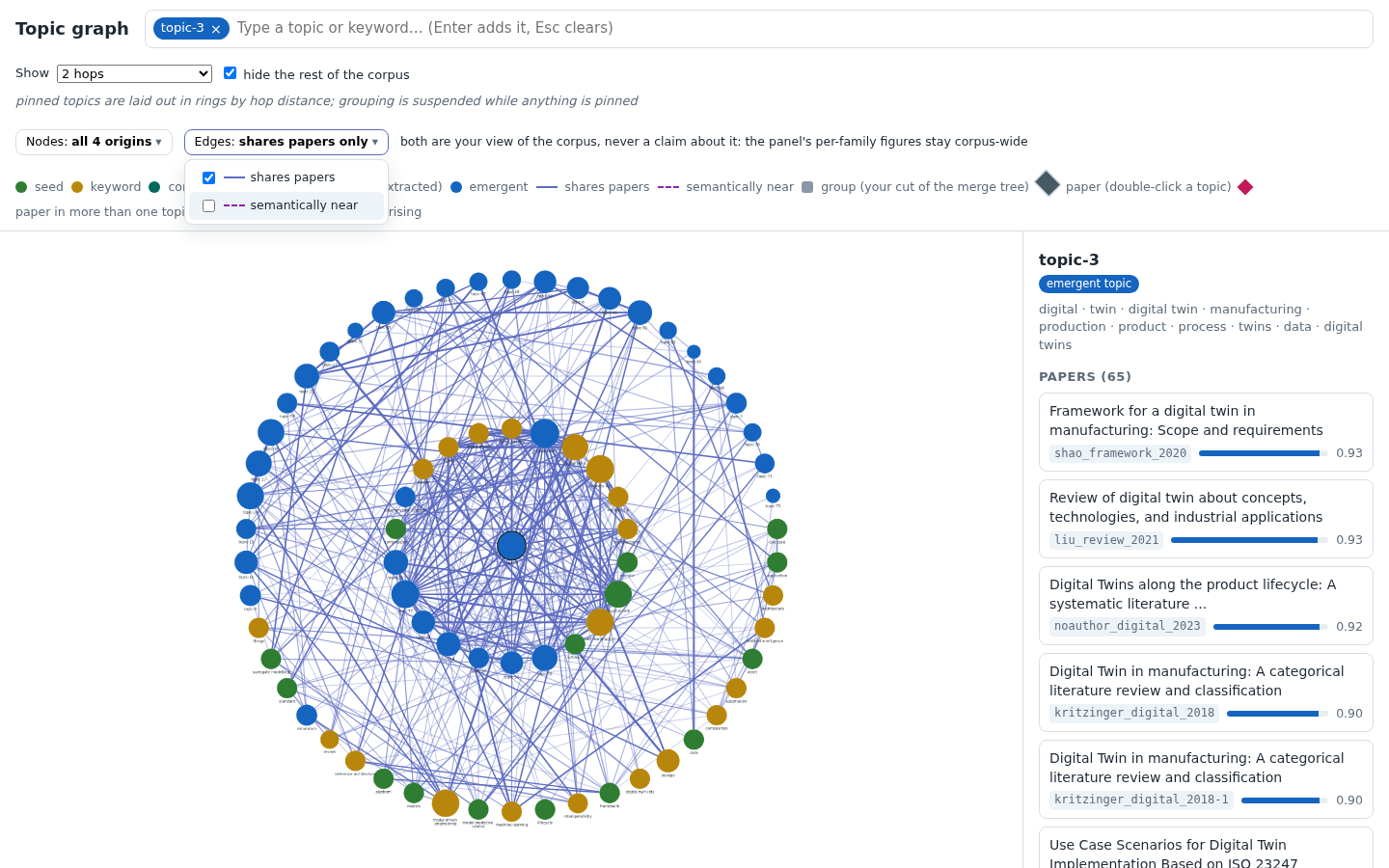
Real corpus, one topic pinned at two hops, semantic nearness off. The Edges picker is the same control over the graph's other axis: the two edge families, shares papers (a shared-paper link that survived the hypergeometric gate) and semantically near (cosine nearness between topic centroids). Its rows carry the legend's own keys, the solid line and the dashed one, so a row can be matched to a line on the canvas.
Switching a family off takes its edges off the canvas and out of the hop walk, which is the part that matters. The rings are hop distance from what you pinned, so with semantic nearness off the second ring means "two shared papers out" instead of "two hops over whichever family got there first", and a topic reached by one shared paper followed by one cosine hop is not on it at all. The terminal has always answered that question per family; the app could not ask it before this control, which exists for that comparison.
Ring 1 is still split by which family reached each neighbour, over the families you have on rather than over the payload's. Past one hop nothing is typed, because a topic there was reached by a path and labelling a path with one family would claim more than the graph supports. Unticking the last family is refused, for the same reason as the last origin class.
The path buttons follow the picker: the button for a family you have switched off is hidden, and a path already on screen over that family is withdrawn instead of left describing lines no longer drawn. The corpus's own arithmetic does not move: the panel's per-family brokerage figures, the absence verdict and the withheld-edge counts stay corpus-wide, because they are statements about the corpus and not about your view of it, and the caption in the header says so.
Terminal: chitragupta corpus discover TOPIC --hops N --family
overlap|semantic asks the same question of the same walk, printing the
rings as text over one family. --path A B --family F walks a chain
over one
family and --clusters reports the two partitions separately; both
predate this control, while --family on --hops landed with it,
because until then the terminal measured hop distance over the union
too.
📷 How the screenshots were made
Each view was exported by corpus discover --app, opened from
file:// in headless Chrome, driven into the state shown by
dispatching the same DOM events a reader's clicks would, and captured
at 1440x900. No screenshot was edited; the sample-corpus shots are
reproducible from the committed
sample project after a corpus sync there.